EKS extended support: why an old Kubernetes version costs $365 more per cluster
An EKS cluster on an old Kubernetes version moves to extended support automatically and bills $0.60 an hour, not $0.10. How to check yours and upgrade.
Key takeaways
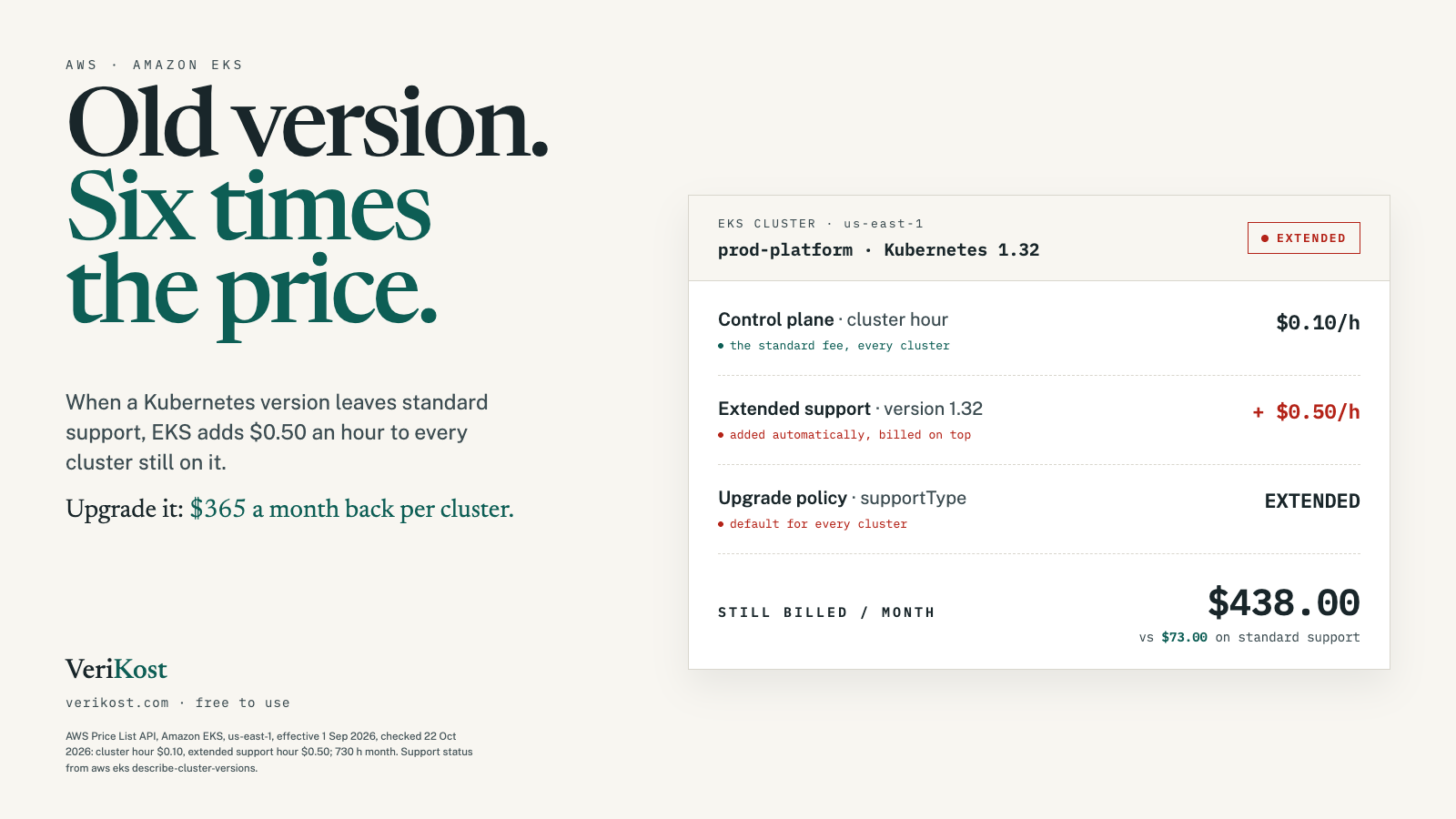
- An EKS cluster costs $0.10 an hour on standard support. When its Kubernetes version gets old, AWS adds $0.50 an hour for extended support, so it bills $0.60.
- That is $73.00 a month against $438.00 in us-east-1, a $365.00 difference per cluster, or $4,380 over a full year of extended support.
- Extended support is on by default for every cluster, and starts automatically 14 months after a version reaches EKS. Nothing in your cluster changes.
- Upgrading to a version on standard support ends the charge. You go one minor version at a time, and nodes and add-ons have to follow.
On this page
An EKS cluster has a fixed hourly fee for its control plane, whatever runs on it. Most people know that fee. Fewer know that it goes up sixfold once the cluster’s Kubernetes version gets old enough, without anyone touching the cluster. Here is what the change costs in us-east-1, how to spot it, and how to get back to the normal rate.
01What is EKS extended support?
Every Kubernetes minor version on EKS gets 14 months of standard support from the day AWS releases it. After that the version moves into extended support for 12 more months, 26 months in all. During extended support AWS keeps patching the control plane, the VPC CNI, kube-proxy and CoreDNS add-ons and its EKS-optimized AMIs. You pay extra per cluster hour for that.
On 22 October 2026, AWS’s own calendar has three versions in extended support: 1.31, 1.32 and 1.33. Version 1.34 leaves standard support on 2 December 2026, so clusters on it start paying extra then.
02How much more does an old Kubernetes version cost?
AWS’s price list has two separate lines: the cluster hour at $0.10, and an extended-support hour at $0.50 that is billed on top of it. Per cluster, over a 730-hour month in us-east-1:
| Support | Hourly | Per month |
|---|---|---|
| Standard supportLowest | $0.10 | $73.00 |
| Extended support | $0.10 + $0.50 | $438.00 |
| Difference | $0.50 | $365.00 |
Now take a team with five clusters (dev, staging, production and two in other regions) that all fell behind together. On standard support they cost $365.00 a month. On extended support they cost $2,190.00, $1,825.00 more every month. A cluster left on extended support for its full 12 months pays $4,380.00 more than it would have on a current version. None of this includes the nodes, which bill the same either way.
03Why does it happen without anyone noticing?
Because nobody has to do anything. Every cluster, new or existing, has an upgrade policy, and AWS sets it to EXTENDED by default. When the version reaches its end-of-standard-support date, billing for extended support starts at the beginning of that day (UTC). The cluster keeps running exactly as before. Nothing breaks, and nothing is redeployed.
AWS does warn you: it posts a notice to the AWS Health Dashboard about 12 months after the version was released, at least 60 days before the date. That notice is easy to miss, and no one has to approve the new rate before it starts. With a new Kubernetes version arriving about every four months, a cluster that nobody upgrades reaches extended support well within a year and a half.
04How do you check if your clusters are on extended support?
First, ask AWS which versions are on extended support right now, and when it ends for each one. Then list your clusters with their version and upgrade policy, and compare. Run this in each region you use:
# Versions on extended support today, and when extended support ends
aws eks describe-cluster-versions --version-status EXTENDED_SUPPORT \
  --query 'clusterVersions[].[clusterVersion,endOfExtendedSupportDate]' --output text

# Every cluster in the region: name, Kubernetes version, upgrade policy
for c in $(aws eks list-clusters --query 'clusters[]' --output text); do
  aws eks describe-cluster --name "$c" \
    --query 'cluster.[name,version,upgradePolicy.supportType]' --output text
done
Any cluster whose version appears in the first list is paying the extra $0.50 an hour. In the console, the Clusters page in EKS has an Upgrade policy column showing which clusters will move onto extended support.
05How do you get a cluster off extended support?
Upgrade it to a version on standard support. That is the only way: once a cluster has entered extended support, AWS won’t let you switch it back to the standard policy. The catch is that EKS upgrades one minor version at a time, so a cluster on 1.31 has to go to 1.32, then 1.33, then 1.34 before it is back on the $0.10 rate. Each step is:
- Check for removed APIs. EKS upgrade insights flag deprecated Kubernetes APIs your workloads still use. Make sure the cluster’s subnets have up to five free IP addresses; the upgrade needs them.
- Bring the nodes level. AWS asks that managed and Fargate nodes run the same minor version as the control plane before you move the control plane up.
- Upgrade the control plane by one minor version, and wait for the update to show
Successful. - Update nodes and add-ons: the node groups, then the VPC CNI, CoreDNS and kube-proxy add-ons, plus anything version-matched like the Cluster Autoscaler.
aws eks update-cluster-version --name my-cluster --kubernetes-version 1.32

# Use the update id the first command returns
aws eks describe-update --name my-cluster --update-id <update-id>
If something goes wrong, you can roll a manual upgrade back to the previous minor version within 7 days. Test each step on a non-production cluster first.
06How do you stop it happening again?
Once a cluster is back on a version with standard support, you can set its upgrade policy to STANDARD. Then, at the end of standard support, AWS upgrades the control plane to the next version instead of moving it onto extended support, and you never pay the extra $0.50:
aws eks update-cluster-config --name my-cluster \
  --upgrade-policy supportType=STANDARD
The trade-off is that the upgrade happens on AWS’s schedule rather than yours, and it only covers the control plane. It is a sensible default for dev and test clusters. For production, the better habit is to upgrade on your own schedule, before the end-of-standard-support date.
Frequently asked questions
How much does EKS extended support cost?
$0.50 per cluster per hour on top of the standard $0.10, so $0.60 an hour in total. Over a 730-hour month that is $438.00 instead of $73.00 in us-east-1, $365.00 more per cluster.
How long does a Kubernetes version stay on standard support in EKS?
14 months from the day the version is released on Amazon EKS. Extended support then runs for 12 more months, so each version is supported for 26 months in all.
What happens when extended support ends?
AWS upgrades the control plane to the earliest supported version, at any time after the end date and with no notice before the update. Your managed and self-managed node groups stay on the old version, and an automatic upgrade can’t be rolled back.
Can I turn off extended support for a cluster already on it?
No. AWS only lets you change the upgrade policy while the cluster runs a version on standard support. To stop the charge, upgrade the cluster to a version on standard support.
Sources
- AWS Price List API, Amazon EKS, us-east-1 (effective 2026-09-01): USE1-AmazonEKS-Hours:perCluster, USE1-AmazonEKS-Hours:extendedSupport
- Amazon EKS pricing page (aws.amazon.com/eks/pricing)
- Amazon EKS user guide: Understand the Kubernetes version lifecycle on EKS, View current cluster upgrade policy, Prevent increased cluster costs by disabling EKS extended support, Update existing cluster to new Kubernetes version
- AWS CLI reference: eks describe-cluster, describe-cluster-versions, update-cluster-config, update-cluster-version